Apple Reminders MCP Server & CLI for Mac
Orchard is an Apple Reminders MCP server and command-line tool for Mac. It lets Claude, ChatGPT, Cursor, Raycast AI, Codex, or any other MCP client create, search, update and complete reminders in the real Reminders app, using Apple’s native EventKit framework rather than AppleScript. Everything runs locally on your Mac. Reminders is one of the three apps enabled on the Free plan.
Works with: Claude Code, Claude Desktop, ChatGPT, Codex, Cursor, Raycast AI, Gemini CLI, GitHub Copilot, and any MCP client — through the Orchard Agent Skill, the orchard CLI, or the Orchard MCP server.
What you can do
- “Remind me to call the dentist tomorrow at 10am.”
- “Show me everything on my Groceries list that isn’t done yet.”
- “Mark the ‘Submit expense report’ reminder as complete.”
- “Remind me every weekday at 9am to review support tickets.”
- “Create a new list called Home Renovation with an orange color.”
- “Delete the reminder about renewing my passport.”
Available tools
| Tool | Description |
|---|---|
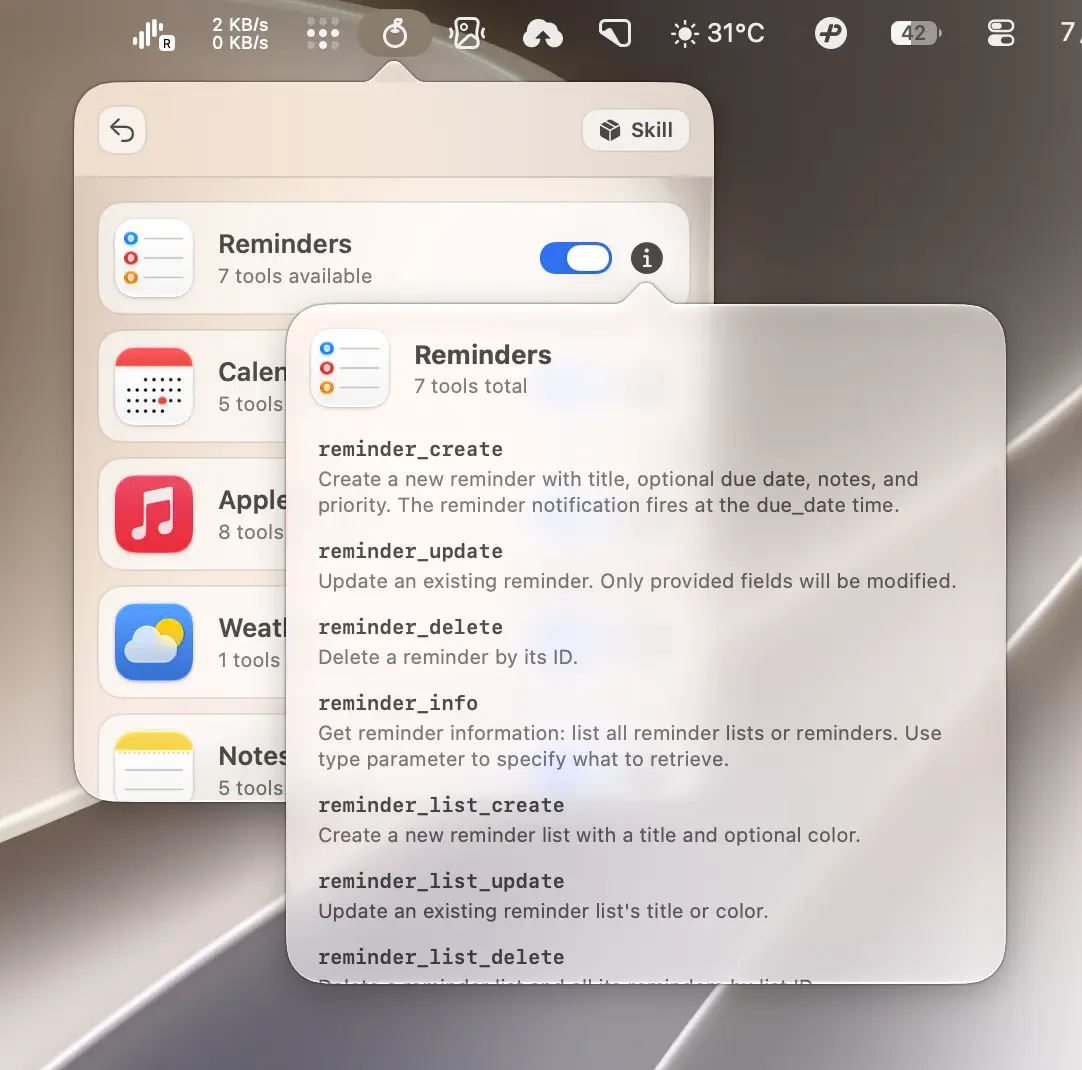
reminder_create | Create a one-time or recurring reminder with title, list, due date, notes, and priority. |
reminder_update | Update a reminder’s fields, completion status, or recurrence rule. |
reminder_delete | Delete a reminder by ID. |
reminder_info | List reminder lists, or list reminders filtered by list, completion status, or due date range. |
reminder_list_create | Create a reminder list with a title and optional color. |
reminder_list_update | Rename a reminder list or change its color. |
reminder_list_delete | Delete a reminder list and all its reminders. |
reminder_create and reminder_update accept priority as an integer: 0 (none), 1 (high), 5 (medium), or 9 (low). New reminders with a due date get a system notification by default; pass enable_alarm: false (or --enable-alarm false from the CLI) to suppress it.
Recurring reminders
Orchard 0.6.2 supports daily, weekly, monthly, and yearly reminders, including intervals and custom weekday/date combinations. A recurring reminder must have a due date because that date anchors the series and its notification time. End the rule either on an inclusive date or after a fixed number of occurrences.
Examples include every weekday, every other Friday, the first Monday of each month, and the last day of the month. Updating a reminder with a new recurrence replaces its existing rule; use a recurrence frequency of none to remove it.
You can also browse this tool list inside Orchard: open the integrations list and click the info icon on the Reminders row.
Finding IDs
reminder_info with type=lists returns list IDs, and type=reminders returns reminder IDs. Ask your AI client to look these up before updating or deleting an item — it usually does this automatically.
Required permissions
Reminders needs Reminders full access. macOS prompts for this the first time you use a reminder tool (or during onboarding if you selected Reminders on the Choose Your Features screen). Grant it in the system dialog, or check its status any time from Orchard’s more options page under Authorization.

CLI usage
The orchard reminder command exposes the same seven operations as subcommands.
orchard reminder create --title "Call the dentist" --due-date "2026-07-14T10:00:00"orchard reminder info --type reminders --list-id ABC123 --status incompleteAdd --status all, --status incomplete, or --status completed to filter by completion state; leaving it off is the same as all. Passing anything else fails with a usage error instead of silently returning everything.
Filter by a due-date range with --due-from and --due-to:
orchard reminder info --type reminders --status incomplete --due-from "2026-08-10" --due-to "2026-08-16T23:59:59+08:00"Create a reminder every weekday for 20 occurrences:
orchard reminder create --title "Review support tickets" --due-date "2026-08-10T09:00:00+08:00" \ --repeat weekly --repeat-days-of-week "mon,tue,wed,thu,fri" --repeat-count 20Remove recurrence while keeping the reminder:
orchard reminder update --reminder-id XYZ789 --repeat none--repeat-until and --repeat-count cannot be combined. Run orchard reminder create --help for the full custom recurrence flag list.
orchard reminder update --reminder-id XYZ789 --completed trueorchard reminder delete --reminder-id XYZ789Moving a reminder to a different list works the same way as any other update — pass the target list’s ID with --list-id:
orchard reminder update --reminder-id XYZ789 --list-id DEF456orchard reminder list-create --name "Home Renovation" --color "#FF9500"Every subcommand accepts --json for machine-readable output. Run orchard reminder <subcommand> --help (or orchard help reminder <subcommand>) for the full flag list — see the CLI Reference for more.
Tips & limitations
- Reminders is enabled by default alongside Calendar, so most users see it working immediately after onboarding.
reminder_list_updateandreminder_list_deleterefuse to touch lists that don’t allow content modifications (for example, some synced or shared lists).- Colors accept either a hex string like
#FF0000or a name (red,green,blue,yellow,orange,purple,pink,brown,gray,black,white). - If a due date is cleared by passing an empty string, any alarm and recurrence rule attached to the reminder is removed too.
- Recurrence
end_dateis inclusive, and a recurring reminder cannot be created withoutdue_date.
Get started
- Download Orchard for macOS (macOS 13 or later; Reminders is free on every plan).
- Connect your AI client: Claude Code, Claude Desktop, Codex, Cursor, Raycast AI and other agents, or any MCP client.
- Or skip the chat entirely and use the
orchardCLI from your terminal.