Apple Shortcuts MCP Server & CLI — Run Shortcuts from Any AI Agent
Orchard is an Apple Shortcuts MCP server and command-line tool for Mac. It lets Claude, ChatGPT, Codex, Cursor, or any MCP client discover, inspect, and run your local Apple Shortcuts, passing input in and reading output back, so every automation you have already built becomes a tool your AI agent can call. Shortcuts is a Pro integration.
Works with: Claude Code, Claude Desktop, ChatGPT, Codex, Cursor, Raycast AI, Gemini CLI, GitHub Copilot, and any MCP client — through the Orchard Agent Skill, the orchard CLI, or the Orchard MCP server.
What you can do
- “List the shortcuts in my Work folder.”
- “What shortcuts do I have that accept text input?”
- “Open the ‘Convert to PDF’ shortcut so I can see what it does.”
- “Run my ‘Clean Downloads’ shortcut, I want to tidy up before a client demo.”
- “Run ‘Backup Photos’ with output saved to ~/Desktop/backup-log.txt, because I’m about to travel.”
Available tools
| Tool | Description |
|---|---|
shortcuts_list | List local shortcuts with name, ID, folder, whether they accept input, and action count. Filter by folder_name or a case-insensitive query. |
shortcuts_folders | List custom Shortcuts folders. |
shortcuts_open | Open a shortcut in the Shortcuts editor by name or ID. |
shortcuts_run | Run a shortcut by name or ID, with optional text/file input and file output. Requires confirm=true and a non-empty reason. |
Required permissions
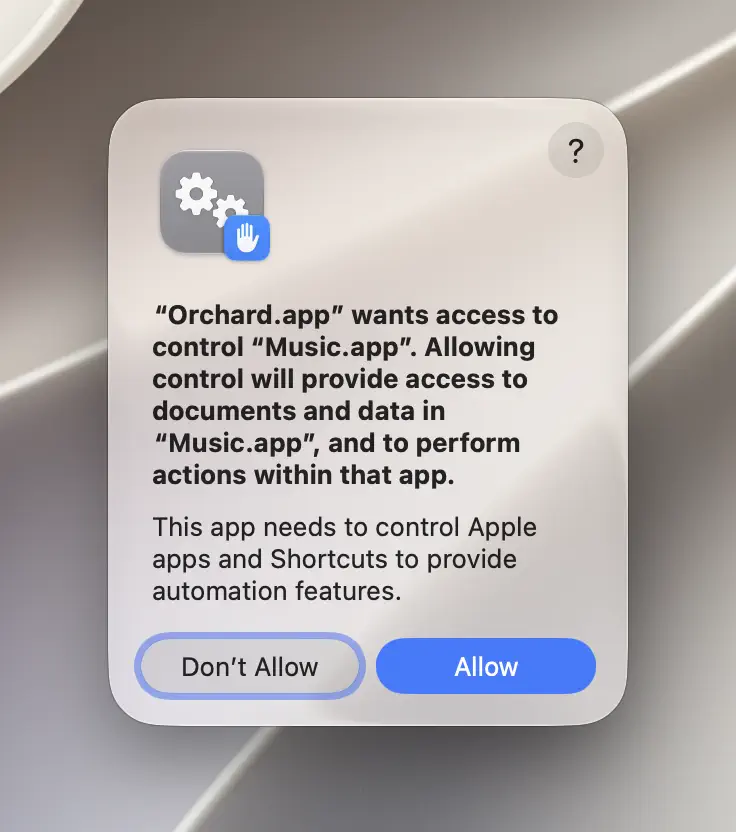
Shortcuts needs Automation permission to drive the Shortcuts app. macOS prompts the first time a shortcuts tool runs; if denied, the error points you to System Settings > Privacy & Security > Automation.
confirm and reason are mandatory, by design
A shortcut can contain arbitrary user-defined automation: file operations, network requests, system changes, anything you’ve built or installed. shortcuts_run refuses to run unless the caller passes confirm=true and a reason. This isn’t a bug, it’s the safety boundary that keeps an AI client from silently triggering an opaque, high-impact action on your behalf, and there’s no way to bypass it.
CLI usage
orchard shortcuts list --folder-name Workorchard shortcuts open --name "Convert to PDF"orchard shortcuts run --name "Clean Downloads" --confirm --reason "Tidying up before a client demo"orchard shortcuts run --name "Backup Photos" --output-path ~/Desktop/backup-log.txt --confirm --reason "Backing up before travel"The CLI mirrors the tool’s required fields: --confirm and --reason aren’t optional for run, no matter how it’s invoked.
Tips & limitations
- Orchard runs a shortcut using its default execution mode unless you request
--output-path,--output-type, or explicitly set--execution-mode cli; those options switch execution to the command-line path instead. Passing--output-path/--output-typetogether with--execution-mode applescriptis rejected, since those options require the command-line path. --inputand--input-pathare mutually exclusive; provide text or a file path, not both.- Default timeout is 120 seconds; override with
--timeout-seconds, capped at 270 seconds. A shortcut that waits on user interaction or runs long will hit this timeout and fail: raise it (up to the cap) for known long-running shortcuts, or split the work into smaller shortcuts. shortcuts_openandshortcuts_runneed the exact (case-insensitive) name or ID, no partial matches. If you’re not sure of the exact name, useshortcuts_listwith aqueryfirst (it matches on any part of the name or ID) to find it, then pass that exact name toopen/run.
Get started
- Download Orchard for macOS (macOS 13 or later; Shortcuts is included in Pro).
- Connect your AI client: Claude Code, Claude Desktop, Codex, Cursor, Raycast AI and other agents, or any MCP client.
- Or skip the chat entirely and use the
orchardCLI from your terminal.